Delivery Trip
A Delivery Trip records Customer Deliveries in one vehicle.
Multiple stops can also be added and Submitted Delivery Note can be tagged per Customer.
1. How to create a Delivery Trip#
A Delivery Trip can be created from a Delivery Note by clicking on 'Create > Delivery Trip'.
- Go to: Stock > Stock Transactions > Delivery Trip > New
- Select the Driver and Vehicle, create both if not present.
- Set the date, departure date and time.
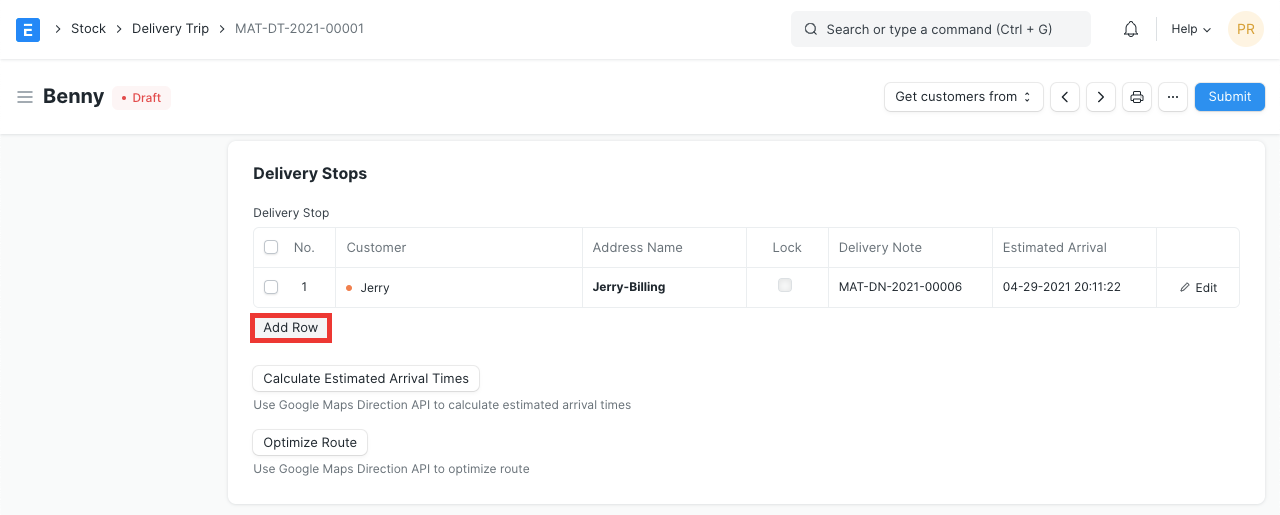
- Add customers for delivery stops, the address will be fetched if already set. Customers can also be fetched by clicking on 'Get customers from > Delivery Note'. Additional Delivery Stops can be added by clicking on the Add Row button before submitting:
- Save and submit.

2. Features#
2.1 Calculate Estimated Arrival Times#
If the Customer address and the Driver address are set, you can calculate the estimated arrival time for the deliveries. This data is fetched from Google Maps.
2.2 Optimize Route#
Using Google Maps, the best route for the deliveries will be calculated.
Related Topics#
Adapted for EnigmaERP from the ERPNext documentation,
© Frappe Technologies Pvt. Ltd. Content licensed under
CC-BY-SA 3.0.
EnigmaERP is a product of Enigma and is not
affiliated with or endorsed by Frappe Technologies Pvt. Ltd.