Setting Company Sales Goal
A Company sales goal gives users a simple monthly revenue benchmark in EnigmaERP. Set the goal on the Company record, then compare it with Total Monthly Sales, which EnigmaERP updates from current-month sales activity.
Use this setting for a company-wide monthly target. Use Sales Person Target Allocation when targets must be assigned by salesperson, Item Group, Fiscal Year, or monthly distribution.
Before you begin#
Confirm that:
- The Company is a leaf company, not only a group node.
- The default currency is correct because the goal is stored in the Company currency.
- Sales transactions use the correct company and posting dates.
- Users responsible for the goal can read the Company record and relevant sales reports.
Choose a target approved by the business. The field does not create a forecast, budget, incentive plan, or accounting entry.
Set the monthly Company sales goal#
- Open the required Company.
- Select the Buying and Selling tab.
- In Buying & Selling Settings, enter the Monthly Sales Target, as highlighted.
- Save.
- Review Total Monthly Sales, also highlighted, to compare actual current-month sales with the target.
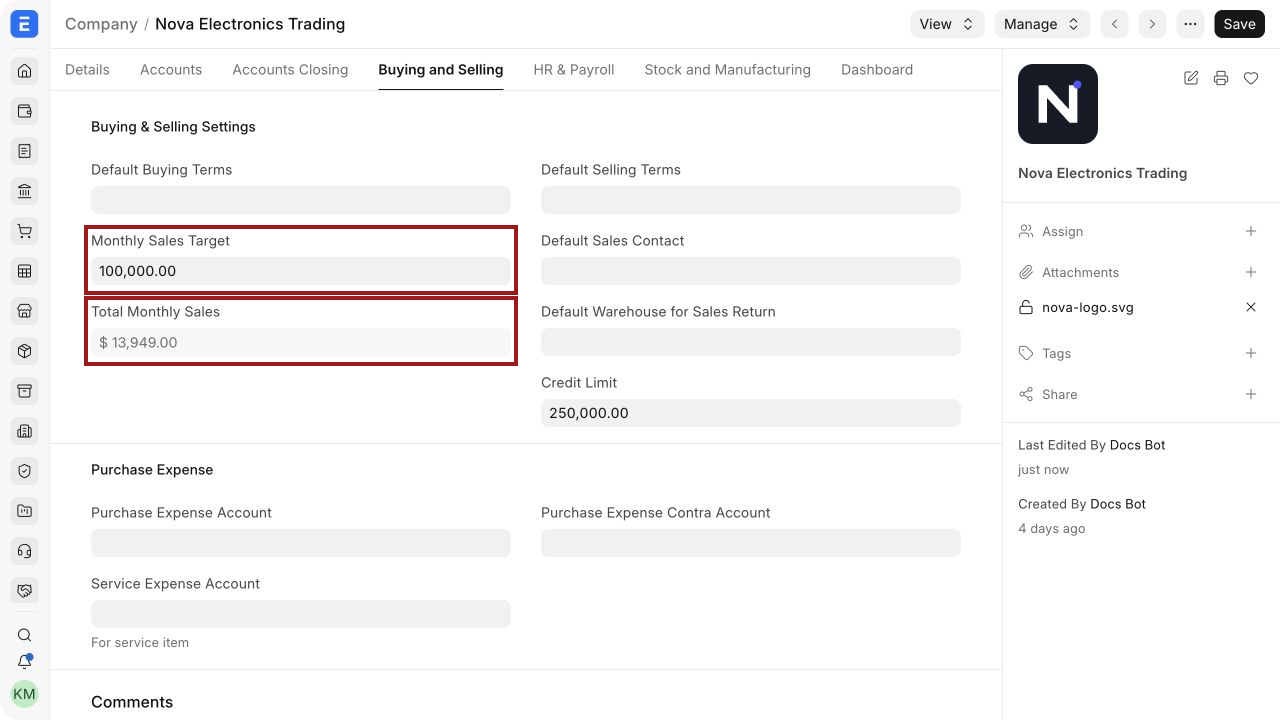
In this example, Nova Electronics Trading has a monthly target of $100,000 and current monthly sales of $13,949.
Fields and what they mean#
| Field | Meaning |
|---|---|
| Monthly Sales Target | Company-wide sales goal for each month, entered in the Company currency |
| Total Monthly Sales | Current-month sales total maintained by EnigmaERP from submitted sales activity |
| Default Currency | Currency used to display and interpret the goal and total |
| Company | Legal entity whose sales contribute to the total |
The target is one recurring monthly value. It does not store a different target for every month. When the plan changes, update the field according to your approval process and record the reason separately if an audit trail is required.
What contributes to monthly sales#
EnigmaERP updates the Company sales history from submitted Sales Invoices. The posting date and Company determine which month and entity receive the value.
For reliable comparison:
- Submit invoices only after the sale is approved.
- Use the correct posting date.
- Keep returns and credit notes in the same accounting workflow so net sales remain meaningful.
- Review Sales Returns when goods or invoiced value must be reversed.
- Use consistent company and currency configuration in multi-company environments.
Draft transactions should not be treated as achieved revenue. A Sales Order represents a customer commitment, while a Sales Invoice records billed sales activity.
Track progress during the month#
Calculate simple achievement using:
Achievement % = Total Monthly Sales ÷ Monthly Sales Target × 100
For the example above:
$13,949 ÷ $100,000 × 100 = 13.949%
Use EnigmaERP reports for the supporting detail:
- Sales Analytics for trends by customer, item, territory, or other dimensions.
- Accounts Receivable for billed amounts that remain outstanding.
- Sales Person Target Variance for salesperson performance against allocated targets.
- Profit and Loss Statement when management needs accounting revenue and profitability rather than the Company goal indicator.
The Company goal is intentionally simple. Build dashboards or reports when the organization requires forecasts, weighted pipelines, separate product targets, or quarter-to-date analysis.
Multi-company considerations#
Set the target separately on each operating Company. A parent group company does not automatically combine or distribute the goals of its child companies.
When Nova Electronics Trading is a child of Nova Industries, its monthly target and actual sales belong to Nova Electronics Trading. Review consolidated financial reports separately when the group needs combined performance.
Use Inter Company Invoices carefully. Internal revenue can distort operational sales goals if the target definition is meant to measure only external customers.
Change or remove a goal#
To change the target, update Monthly Sales Target and save. EnigmaERP uses the new value for comparison with the current total.
To stop using the indicator, set the value according to your organization's convention, usually zero, and save. This does not change invoices, accounting entries, or historical transactions.
Troubleshooting#
Total Monthly Sales is not updating#
Confirm that the Sales Invoice is submitted, uses the same Company, and has a posting date in the current month. Refresh the Company record after the transaction completes.
The total is lower than expected#
Review credit notes, returns, posting dates, and company filters. Confirm that expected invoices are submitted rather than saved as drafts.
The total is in the wrong currency#
Check the Company's Default Currency and the invoice conversion rate. The Company goal is interpreted in company currency.
Users cannot edit the target#
The user may lack permission to write the Company record. An administrator can review Role-Based Permissions and the user's company permissions.
A parent company does not show combined child sales#
Use consolidated reports or a dashboard designed for group analysis. The field is maintained per Company.
Frequently asked questions#
Can I enter a different target for each month?#
Not in the single Company field. Use target allocation and Monthly Distribution for more detailed planning.
Does the target block sales when it is exceeded?#
No. It is an informational benchmark.
Does changing the target alter accounting records?#
No. It changes only the goal used for comparison.
Can I use Sales Orders instead of Sales Invoices for actual performance?#
Use an order-based report or dashboard for bookings. The Company monthly sales total is based on submitted sales activity maintained by EnigmaERP.
Is this the same as a budget?#
No. Use Budgeting for accounting budgets by account and cost center.