Create and Apply Coupon Codes
A Coupon Code connects a customer-entered web-store code to a coupon-based Pricing Rule. Use it to offer a controlled discount through a promotional code or a customer-specific gift-card-style code.
Before you begin#
Confirm that:
- Your EnigmaERP web store is configured.
- Coupon entry is enabled in E-commerce Settings.
- The eligible Items and prices are available online.
- You have created a Selling Pricing Rule with Coupon Code Based enabled.
Coupon Code does not define the discount by itself. The linked Pricing Rule defines eligibility and the price or product discount.
Create a coupon-based Pricing Rule#
- Open Pricing Rule and select Add Pricing Rule.
- Configure the eligible Items, Item Groups, transaction conditions, quantity or amount limits, and validity.
- Choose Price Discount or Product Discount.
- Enable Coupon Code Based.
- Save the rule.
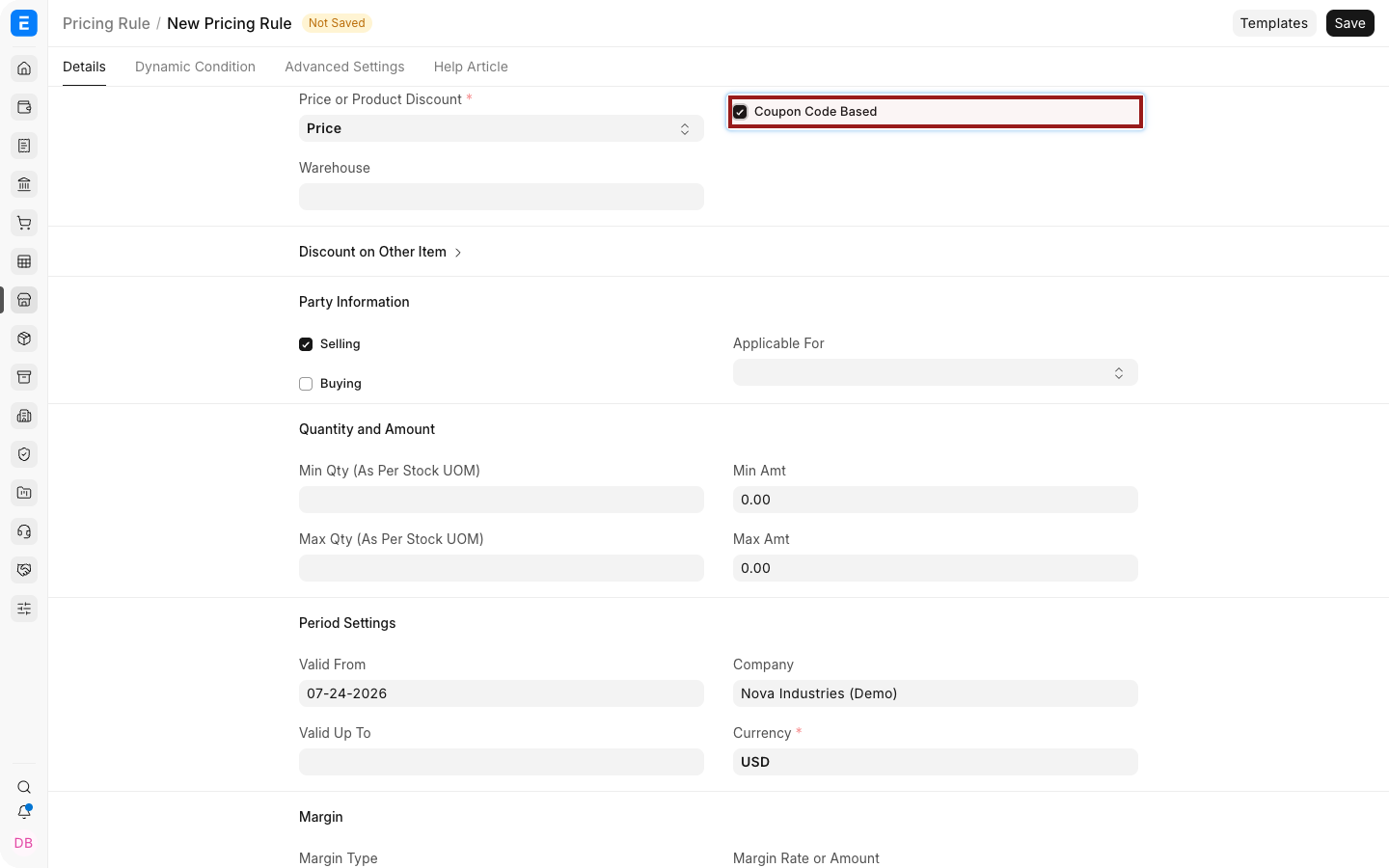
Avoid overlapping coupon rules unless their intended priority is tested.
Create a Coupon Code#
- Open the Coupon Code list and select Add Coupon Code.
- Enter a Coupon Name.
- Select the Coupon Type:
- Promotional creates a reusable code derived from the name.
- Gift Card generates a random code intended for more controlled distribution.
- Select the coupon-based Pricing Rule.
- Set Valid From and Valid Upto.
- Set Maximum Use when total redemptions must be capped.
- Add a description that can be reused in campaign communication.
- Save.
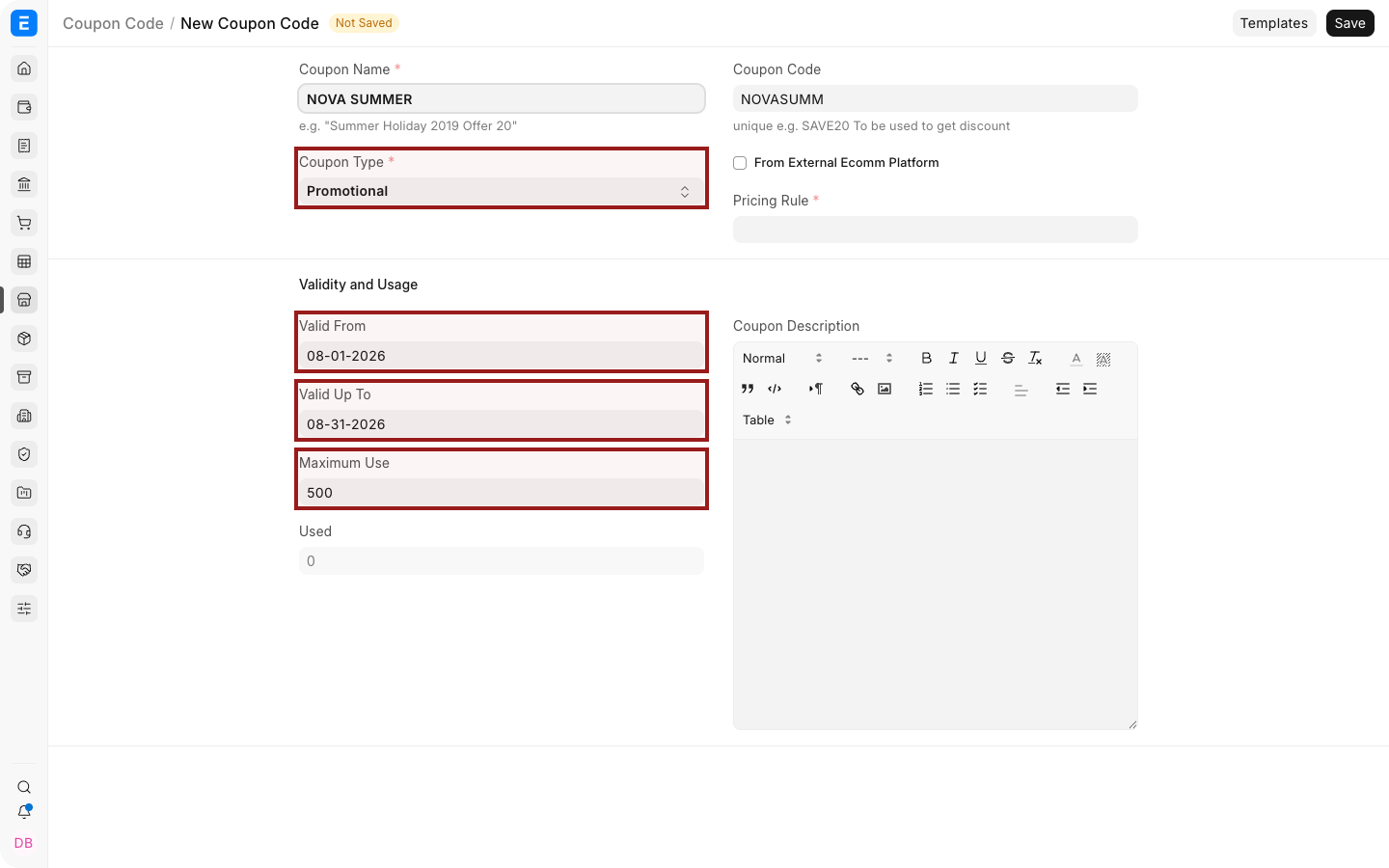
The generated Coupon Code is unique and read-only. Review it before sending campaign material.
Apply a Coupon Code#
A shopper can enter the code in the web-store coupon field. After EnigmaERP validates the code and linked rule, eligible prices are recalculated.
A campaign link can also include a coupon parameter:
https://shop.example.com/products/aerobook-14?cc=SUMMER20
Use only URLs supported by your current web-store implementation and test the complete customer journey before distribution.
Usage and validity#
| Field | What it controls |
|---|---|
| Coupon Type | Whether the code is promotional or randomly generated |
| Pricing Rule | The discount and eligibility conditions |
| Valid From / Valid Upto | The redemption period |
| Maximum Use | Total number of permitted uses |
| Used | Number of submitted Sales Orders that consumed the coupon |
| Coupon Code Description | Supporting campaign or email text |
The Used count increases when qualifying orders are submitted. Cancelling or amending transactions can affect operational interpretation, so audit the linked sales records when usage appears unexpected.
Test before launch#
Test at least:
- An eligible Item and quantity.
- An ineligible Item.
- Dates before, during, and after validity.
- The maximum-use boundary.
- Logged-in and guest checkout when both are supported.
- Another automatic Promotional Scheme or discount that could overlap.
Troubleshooting#
| Problem | What to check |
|---|---|
| Coupon field is missing | Enable coupon entry in E-commerce Settings |
| Code is rejected | Check spelling, validity, maximum use, and linked Pricing Rule |
| Code applies no discount | Confirm that the cart satisfies every Pricing Rule condition |
| The wrong discount applies | Review overlapping Pricing Rules and priority |
| Used count is unexpected | Review submitted Sales Orders that contain the coupon |
Frequently asked questions#
Can a Coupon Code be used in Desk sales transactions?#
Coupon Code is designed for the web-store application flow. Use a Pricing Rule directly for Desk transactions.
Is a Gift Card Coupon Code a stored-value payment instrument?#
No. In this feature it is a generated code linked to a Pricing Rule, not a financial wallet.
Can one Coupon Code link to several Pricing Rules?#
A Coupon Code links to one Pricing Rule. Use that rule's conditions to define the offer.
Can I limit one redemption per customer?#
Maximum Use caps overall use. Confirm whether your current web-store workflow enforces any customer-specific limit you require.